
|
Last Site Update: April 30th, 2026 | Latest Version: 13.1.0 |
|
|
|
|
|
|
|
|
|
|
|
|
|
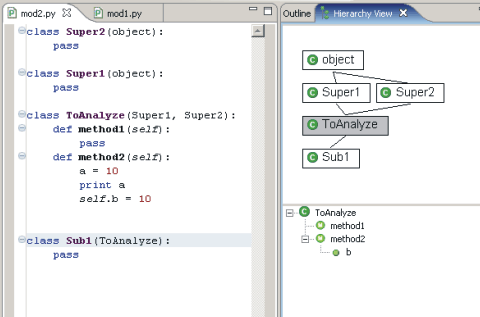
Hierachy ViewIn PyDev you can use F4 to open the hierarchy view for you while over some class definition. The Hierarchy View allows you to check a class hierarchy, seeing the relations as well as methods and attributes for all the classes in the hierarchy.
|
PyDev developmentPyDev is open source and depends on your contributions! This may be in the form of bug fixes, answers on stackoverflow, new features...Another option is financially supporting it at: Patreon (which provides a way to support it monthly and get rewards starting with $1). 
Or through 1-time contributions at: Paypal 

Search PyDev-related content |
|
|
|
|
Copyright: Brainwy Software Ltda, 2014-2025 |